IMPORTANT: REGISTER THROUGH MAX’S LINK IF YOU WANT TO WORK WITH MAX AND RECEIVE HIS PERSONAL SUPPORT.
Create your affiliate account through Max
Use my affiliate registration link before creating your account. In the onboarding process described here, registration through this link assigns your new affiliate account to me automatically. After completing the form, send me your Login from step 3 and three to five preferred promo code names on Telegram. Managers do not usually start the conversation themselves in my onboarding workflow: message me immediately after registration so I can help move the review and setup forward. Do not simply wait for an introductory email.
If you already have an affiliate account, contact your existing manager or message me to explain your situation. Creating another account is not the solution.
To create a 1xBet affiliate account, open your manager’s registration link, complete the three registration steps, save your login details, and contact the manager for account review and promotional tools. The three steps are Contact details, Additional information, and Login and password. This guide explains every field shown in the five mobile illustrations below, including Gmail, your traffic source, payment preferences and what to do immediately after registering.
This is a guide to a 1xPartners affiliate account for publishers, Telegram channel owners, YouTube creators, website owners and other traffic partners. Your 1xBet partner account, also called a 1x affiliate account, is the business account used to track your referred players and affiliate commission. A player account has a different purpose, even though one is used for the first affiliate payout in the process explained later.
How to create a 1xBet partners account: the short version
There are three screens in the registration form. The first screen is long, so this article shows it in two screenshots. The second screen asks about your traffic and payment preferences. The third creates your affiliate login and password. Completing those screens submits your registration; account approval and first-payment approval are separate stages.
- Open Max’s registration link. Use the link in this guide if you want your new account assigned to Max.
- Enter contact details. Use your real first and last name, your own Gmail address, and a messenger contact you can access.
- Add your traffic and payment information. Describe the actual source you have or plan to develop. A payment preference does not activate payouts.
- Create and save your Login and password. Read the terms, submit the form, and retain access to the Gmail account you registered with.
- Message Max. Send the Login you entered and three to five promo code options. Your traffic-source link is useful additional information.
- Wait for account review and setup. Get your code, tracking link and guide, then confirm that you are ready to promote.
Keep the first-payment approval checklist available from the start. It explains the later requirements without confusing them with opening an affiliate account.
A short glossary for new 1xBet affiliates
- Affiliate account
- An affiliate account is the business account used to manage your partnership, track referred players, view reports and monitor commission. It is different from the account a customer uses to place bets.
- 1xPartners
- 1xPartners is the affiliate platform discussed in this guide. Searches such as “1xBet partner account,” “1x affiliate account” and “1xBet affiliate account” can refer to this affiliate setup process.
- Affiliate manager
- An affiliate manager supports a partner with account setup, promotional tools, traffic questions and program processes. My work with partners covers these affiliate matters; I do not resolve individual players’ betting or withdrawal cases.
- Login and AFF ID
- Login is the username you choose on registration screen 3. AFF ID is the affiliate identifier shown in your partner account. They help a manager identify your account; neither is your password.
- Traffic source
- A traffic source is the channel through which you reach your audience, such as your Telegram channel, Facebook page, YouTube channel or website. The traffic-source link in the form should identify a source you actually control.
- GEO
- GEO describes the country or market of your audience. Your audience’s GEO and the personal country field in a registration form are different pieces of information.
- Affiliate link
- An affiliate link contains tracking information used to attribute eligible referrals to an affiliate. Obtain your own prepared link and preserve its tracking parameters when you use it.
- Personal promo code
- A personal affiliate promo code is a code assigned to a partner for referrals. Asking to create your own affiliate promo code is different from looking for an existing bonus code to use as a player.
- FTD
- FTD means first-time depositor or first-time deposit, depending on the report. For the first affiliate payment process described here, five genuine referred players must have made their first deposits.
- Revenue Share or RS
- Revenue Share is a commission model in which an affiliate receives an agreed percentage of the program’s eligible revenue from attributed players. It is not automatically a percentage of every deposit.
- NGR
- NGR means net gaming revenue. The agreement and reporting rules determine the adjustments used to arrive at the commission base. Check how bonuses, fees, settled results and other adjustments affect your account.
- Payment-method approval
- Payment-method approval is the process that enables eligible affiliate payouts to the approved destination. Choosing a method in the signup form and having it approved for payment are different events.
Why registering through your manager’s link matters
If your goal is to work with me, the important decision happens before you submit the registration form: start through my registration link. According to the account-assignment process I use, that is what connects your new affiliate account to me. Sending a Telegram message after registering through an unrelated link does not automatically move an existing account into my partner base.
The practical benefit is a clear person to contact during setup. You can send your Login, ask about account review, discuss a suitable promo code and request a tracking link for your approved source. When you later reach the first-payment stage, I can point you to the correct process and support channel for your account.
This requirement concerns my personal onboarding and ongoing affiliate support. It does not mean that the affiliate program has no support for accounts assigned elsewhere. Existing partners should use their assigned manager and the program’s support process. If your account is new and you have not started working, explain that to me before taking any further registration action.
Keep the complete registration link intact. If it does not open, message me and tell me your country, browser and the error you see. A screenshot without private account information can help. Do not register through an unrelated link simply to get past the problem if your intention is to join my partner base.
Start registration with Max’s link
What to prepare before you open the form
You can start the application process even if you have not yet built a large website or channel. In my onboarding workflow, an established audience is not a prerequisite for starting registration. Be clear about your stage: an existing publisher should describe the real source, while a beginner should explain what they intend to build. Applications remain subject to the program’s eligibility rules and approval.
Prepare a Gmail address that belongs to you, your real first and last name, a messenger contact and a secure way to save your Login and password. If you have a Telegram channel, Facebook page, YouTube channel or site, have its link ready. Think of three to five possible promo code names so we can check options after registration.
Use the same personal details as on your passport or national ID. The registration process shown here does not require you to upload identity documents at signup. However, a later request to change sensitive account information may trigger an ownership check. Accurate details from the beginning make it easier to show that you are the genuine account owner if security verification becomes necessary.
There is no reason to send your password, a login code or an identity document in the first Telegram message. For an initial account check, I need an account identifier and an explanation of the request. If a formal verification is later required, follow the program’s specified secure process.
Before creating an account, check whether you already have one. Clause 1.6 of the published affiliate agreement (1xBet affiliate registration) prohibits repeated affiliate registration. A forgotten Login, an inactive account or a change of manager should be handled as an existing-account issue.
Watch the 1xBet affiliate registration video
The video below accompanies this written guide. You can watch the overall process, then return to the individual screenshots and field explanations. The captions here explain which details belong to you and which values in the screenshots are examples.
Watch “How to Register for the 1xBet Affiliate Program” on YouTube.
These instructions describe the screens and onboarding details supplied for this guide on September 23, 2026. Interfaces can change. If a required field or confirmation step is different when you register, follow the current form and ask me about the difference.
Step 1: enter your contact details
The first registration screen is titled Contact details. On a phone, you may need to scroll to see all of its fields. Screenshots 1 and 2 below belong to this same step; they are not two separate registration stages.
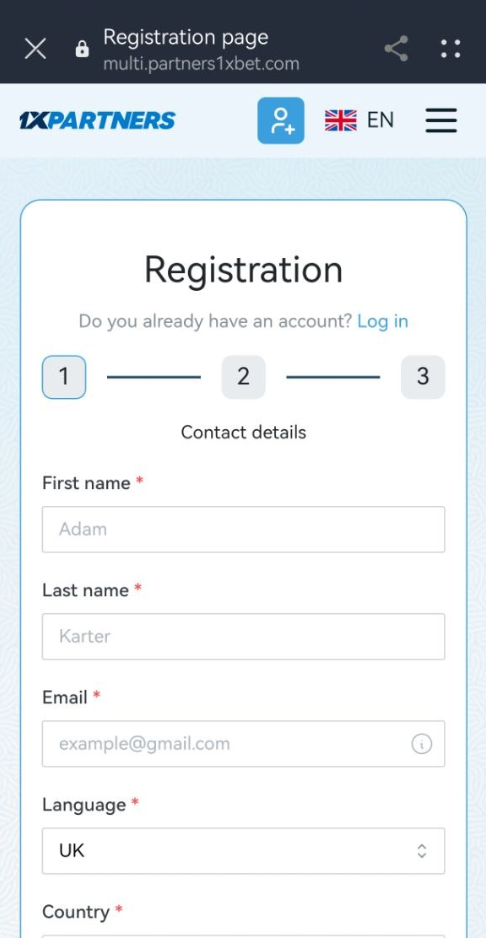
Your first and last name
Enter your own first name and last name using the spelling that matches your identity documents. Do not use your channel name, a promo code or a made-up identity in these personal-name fields. A channel name identifies your publication; your legal personal details identify the person who owns the account.
This matters even though documents are not requested at the point shown in the screenshot. Account ownership can become important later, for example when you ask to change sensitive details. Treat these fields as part of a long-term business relationship rather than as disposable signup information.
Use Gmail for your affiliate email
Gmail is required for the onboarding process I describe in this guide. I require it because messages sent from other email domains may not reach the affiliate support workflow I use. Enter a working address ending in @gmail.com that you control and can continue to access.
Check the address character by character before moving on. A missing letter or incorrect domain can leave you unable to receive important account communication. Use your own address, not a temporary mailbox or an address that belongs only to someone helping you fill in the form.
As of the review date, email confirmation is not required in the signup process described here. An email-confirmation step may be introduced later. If the live form asks you to confirm a link or code, complete that current requirement. Do not interpret the absence of a confirmation email today as proof that registration has failed.
Language, country and messenger contact
Continue down the same screen to check the remaining contact fields. The screenshots show a Country field, but they do not show a currency selector. The displayed country and telephone prefix are examples. Select accurate personal details appropriate to your situation, rather than copying the screenshot’s UK selection or +44 prefix.

Choose the language you can use to understand the account interface and messages. Do not treat an unusual default value in a demonstration screenshot as an instruction. If the selector is unclear, ask before submitting rather than choosing a setting you cannot use.
If you provide a telephone number, use your own number and the correct prefix. In the Messenger selector, choose the contact method you actually use. Telegram is convenient for communicating with me; enter your reachable Telegram username in Username in messenger.
Your messenger username and your future affiliate Login are separate. The messenger field tells us where to contact you. The Login chosen in step 3 identifies the affiliate account. Saving both avoids confusion when you send your first message after registration.
Review the fields, then tap Next. If a required field is highlighted, correct it on this screen. Do not keep submitting inconsistent versions of your name or contact details to get past a validation message.
Step 2: add your traffic source and payment preferences
The second screen is called Additional information. It collects context about your application and an initial payment preference. This is the stage where many beginners confuse a required form field with final commercial or payout approval.
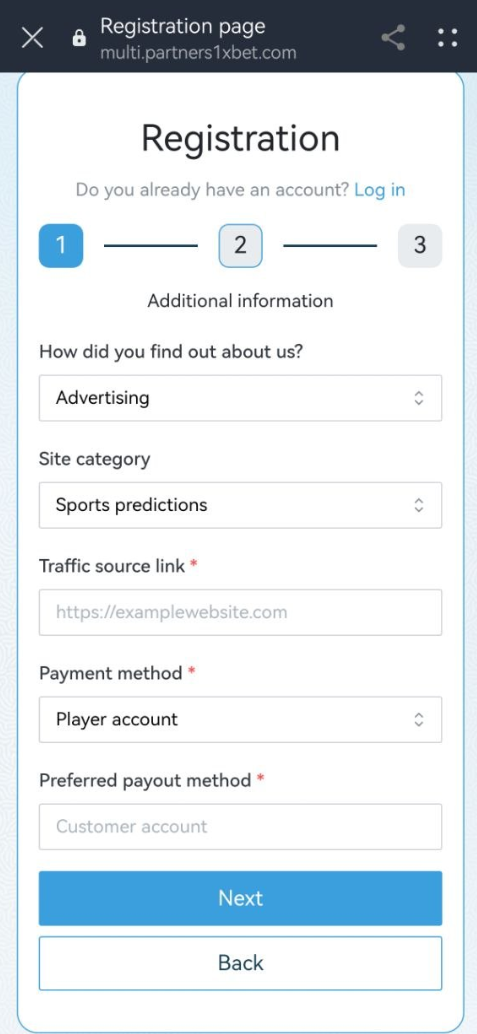
How did you find out about us?
Choose the option that best describes how you discovered the program. The example shows Advertising. You do not need to copy that option if it does not describe your route. The purpose of the question is to provide background about your application.
Site category
Choose the category that most closely fits your content or planned source. Sports predictions appears in the screenshot, but it is not a requirement to claim that you publish sports predictions. A football news channel, a sports discussion community and a comparison website can have different editorial formats. Describe what you actually operate.
Traffic source link
If you operate a Telegram channel or Facebook page, its real link is a useful source to provide here. A website or YouTube channel can also give the manager context about your audience. The screenshot labels the field Traffic source link, so include the actual URL when you have one, rather than only typing a platform name.
For a Telegram publisher, use the channel’s own link. For Facebook, use your actual page or other relevant source you control. If the source is private, explain how it can be reviewed. Do not enter another creator’s channel, invented statistics or a random popular page to make the application look more established.
You can discuss joining while you are still building your first source. If you do not yet have a link that the required field accepts, message Max about your planned source and ask what to provide. We can work through the appropriate next step without inventing ownership of an audience.
Payment method and preferred payout details
You may select an available payment preference during registration and complete the details requested for that selection. The screenshot shows Player account, with an additional required field for the preferred payout details. The exact fields can depend on the method selected.
Your initial selection does not override the first-payment process. In the onboarding workflow I use, the first affiliate payout must go to an approved player account, after five genuine FTDs and a request to affiliate support. Selecting a different method at registration does not remove those requirements or mean that a cryptocurrency payout has already been approved.
If the form requires account details you do not yet have, ask me how to proceed with that field. Do not enter somebody else’s receiving account or an invented account number. The purpose is to set up your own partner relationship with accurate information.
Read how the first payout method is approved before assuming your choice on this screen is ready to receive money. That guide also explains the request to support, the minimum payout amount and what changes after the first payment.
Currency in the account and currency of a payout
There is no currency-selection field in the three registration screens shown here. In the account setup I describe, balances are generally displayed in US dollars outside CIS markets. Display currency and the currency available through a payout route are not necessarily the same thing.
Depending on the approved method and market, a later payout may be received in dollars or a supported local currency. Confirm the actual receiving method and any conversion conditions when arranging approval. The registration form alone does not establish support for every local currency or payment provider.
Once the information is accurate, tap Next. Keep the distinction clear: these are application details, not confirmation that commission has been earned or that a payout is due.
Step 3: create your Login and password
The final screen is titled Login and password. This is where you choose the affiliate username you will send me after registration. The screenshot’s User24 is an example; create and save your own Login.

Choose a password that you do not reuse for other accounts, enter it again in the confirmation field, and store it securely. Keep access to the associated Gmail address. The Login is not the same as your Gmail address or Telegram username unless you have deliberately used the same text where the form permits it.
Read the terms and policies before accepting them. The screenshot also shows a separate news-consent checkbox; read its wording and make your own choice about receiving updates. Agreement to the program’s terms and a preference for promotional news are different decisions.
When the required fields are complete, tap Register. Pay attention to the resulting confirmation or validation message. If the form reports a problem, correct the indicated field. Avoid creating another application with different personal details because the first submission’s status is unclear.
Save three things you will need later: your Login, access to your registered Gmail account, and your password. Share the Login with me for account identification. Do not send your password or one-time authentication codes.
“Application received!”: your registration was submitted
After a successful submission, the form can display the confirmation below. “Application received!” means that your application has been created and is waiting for review. It is not confirmation that the affiliate account has already been approved, that a promo code is active, or that the first payout method is ready.

The screen says a manager will email you after review. In my actual onboarding workflow, managers usually do not initiate the conversation themselves. To help speed up the review, write to me as soon as you finish registration instead of waiting for a message. Send your Login from step 3 and three to five promo code options on Telegram. Contacting me gives me the account details needed to help; it does not guarantee a particular approval time.
The manager link still comes first. To work with me, you need to have created the account through my registration link. A message after registering through someone else’s link does not automatically assign that account to me. If that has already happened, explain the situation without creating another account.
What to send Max immediately after registration
Do not wait for a manager to contact you first. In my normal workflow, you should initiate the conversation after submitting the application; there is no need to wait until you have a large amount of traffic. As soon as registration is complete, send your Login from step 3 and three to five preferred promo code names to @AffiliateManager1xbet_Max. A link to your traffic source and its main countries can help, but these extra details are not required in the initial message described here.
Use a short message that clearly identifies the account. This is more useful than sending several greetings without the information needed to find your registration.
Hi Max! I registered through your link.
My affiliate Login: [your Login from step 3]
My preferred promo code names: [option 1], [option 2], [option 3], [optional 4–5].
Please check my account and help me get my promo code, tracking link and Affiliate Guide.
Optional: My traffic source is [your channel or website link], and my main audience countries are [countries].
When an AFF ID is available in your account, include it in follow-up messages about that account. You do not need to publish the identifier in your channel or in comments under an article; send it privately with the relevant request.
Send your Login and promo code options to Max
How long does 1xBet affiliate account approval take?
In my normal onboarding workflow, account approval usually takes up to 24 hours on weekdays. Applications submitted over the weekend are generally handled on Monday. This is the usual working schedule I describe for my partners, rather than a guarantee that every application will be accepted within a fixed number of hours.
A complete, consistent application is easier to review. Real personal details, a reachable Gmail address and the correct Login in your Telegram message reduce unnecessary clarification. If I ask about your traffic, a direct explanation of what you operate or plan to build is more useful than an exaggerated audience claim.
There are three different milestones. Registration means you have submitted the form. Account approval means the application has been reviewed for working in the program. Payment-method approval is a later process connected with receiving eligible commission. Approval of the account alone does not mean a payout is available.
If the normal weekday review window has passed, reply in the same Telegram conversation with your Login or AFF ID and when you submitted the form. For a weekend application, allow for the Monday processing schedule. Re-registering to try to obtain a faster response can create a duplicate-account problem.
For the separate timeline that applies to payment verification, see the first affiliate payout approval process. The 3–5 business days described there concern the first-payment review, not this normal registration review.
How to create your own promo code in 1xBet as an affiliate
To get a personal affiliate promo code through my onboarding process, register through my link and send me your Login plus three to five preferred code names. I check the options and arrange the code for your affiliate account. A name you type in a Telegram message is only a request until the code has been created and confirmed.
Creating your own 1xBet affiliate promo code means requesting a code connected to your partner account, which you can use in your own promotional content. It is different from copying a public player bonus code from another website.
How many codes do new partners receive?
The normal starting arrangement I describe is one promo code per new partner. Send several possible names so we have alternatives if a name is unavailable or unsuitable. Sending five name options is not a request to receive five active promo codes at the start.
After a partner brings five players with first deposits, I can arrange a second code. My published starting schedule also describes a third code after 10 new players and a fourth after 100 new players. Ask me to confirm the qualifying players for each later request; the five-player first-deposit condition above should not be silently assumed to define every later threshold. If you already own several strong, genuinely separate traffic sources, explain that before setup: several starting codes may be possible after reviewing those sources.
Use the number of codes that serves a real tracking or audience need. Creating many names without a source plan does not itself generate traffic or commission. For later code requests, send the existing code, your affiliate identifier and the source where you intend to use the new one.
How to choose suitable promo code names
For the rules supplied for this guide, a code cannot contain numbers only. Suggest names made from Latin letters, optionally combined with digits. A word such as example or a letter-and-number combination such as example1 illustrates the format; those are examples, not codes being offered to readers.
Do not propose the word “Somali,” variations of that word, or the number sequence “252.” Do not use celebrity names or city names. Availability and final acceptance still have to be checked, so preparing three to five alternatives is useful.
A memorable code can be easier to repeat in a video or Telegram post, but the important operational step is confirmation that it belongs to your affiliate account. Before publishing, copy the confirmed spelling exactly. Do not assume that a similar code, a different digit or another partner’s code will attribute referrals to you.
Keep the account rule separate from the code rule. You may discuss additional promo codes for an existing partner account; that does not permit additional affiliate accounts. The program’s single-account restriction still applies.
Get your affiliate tracking link through your manager
Alongside the promo code, ask me to prepare your affiliate link. A partner needs a working destination and the correct tracking information. Copying an ordinary player homepage address is not the same as using a link prepared for your affiliate account.
In my experience with some markets, a standard link’s destination domain can stop being available within a few days, sometimes within 3–5 days. That is an operational observation, not a fixed lifetime for every link. Availability varies, and no domain should be described as guaranteed to remain reachable indefinitely.
I can help choose an appropriate link format for the approved source and market, and help check it when availability changes. Obtain the link through our conversation rather than building a new address by guessing which tracking parameters to keep or remove. Do not substitute an unrelated public link simply because it happens to open.
Before placing the link in a pinned Telegram post, video description or website button, open it on a phone and confirm that it reaches the intended destination. Preserve the complete link as provided. If you want to use an extra redirect or tracking service of your own, discuss it first so the attribution path can be checked.
Testing that a page opens does not require registering yourself as a referred player or making a personal deposit. The agreement prohibits creating your own player account through your own referral link. Ask about tracking verification through the proper partner process instead.
When reporting a broken link, provide the complete link, country, device or browser, approximate time and a screenshot of the visible error. Keep account passwords and private financial information out of the screenshot. This gives us enough context to investigate the actual issue.
What is the 1xBet affiliate commission?
The standard starting Revenue Share rate I describe for most eligible markets is 25%. Uzbekistan is an exception, with a 15% starting rate. Higher rates depend on the applicable arrangement, qualified performance and the account’s market mix. Registering successfully does not by itself qualify every partner for the highest advertised rate.
Under RS, the affiliate earns an agreed share of eligible program revenue from attributed players. The amount is not automatically 25% of deposits, betting turnover or every balance shown in the dashboard. Understand the commission base before you use a percentage to estimate potential earnings.
For a simple illustration, suppose the eligible revenue base is $100 after the applicable adjustments and the agreed rate is 25%. The commission calculation is $100 × 25% = $25. This is an arithmetic example, not an earnings forecast or a guarantee that $25 is immediately available for payout.
Bonuses, payment-related adjustments, the results of settled bets, unsettled events and other agreement terms can affect the report and available amount. The existing Revenue Share guide explains the model; the payout calculation guide separates commission from money available for the next transfer.
Bangladesh and Egypt commission examples
For the country ladders previously explained for my partners, Bangladesh uses 25% for 0–99 monthly FTDs, 30% for 100–299, and 35% from 300 inclusive. Egypt uses 25% for 1–50 monthly FTDs, 30% for 51–100, 35% for 101–350, and 40% from 351.
These are qualifying account arrangements, not a reason to assume that selecting a country on a registration form changes your rate. Account-wide volume and the applicable country-majority requirement matter. The higher qualifying rate is calculated for the relevant month under the described ladder process. Confirm your eligibility before projecting commission.
The full RS rates and country-ladder explanation is kept in the payments guide. For a new registration, the useful next step is to describe your audience and source so we can confirm the arrangement that actually applies to your account.
Registration payment preferences and your first payout
You can choose an available payment preference in the registration form, but the first payout in my onboarding process must be received on an approved player account after five genuine FTDs and a request to affiliate support. The first payment is not triggered simply by selecting Player account or another method on screen 2.
The sequence is: attract five genuine first-time depositors, submit the required first-payment request, receive approval of the payment method, and meet the payout minimum. The available amount must reach at least $30 for the payment process described in our payout guide. Otherwise it carries forward until the threshold is reached.
Following approval, eligible payouts are automatic on Tuesdays under the process previously described for my partners. A later cryptocurrency or other payout route must be arranged through the appropriate approval process. Do not infer from a registration dropdown that every method is already available for a first transfer.
If you do not know which support channel to contact, ask me and include your AFF ID. State whether you have the five FTDs, whether a first-payment request has been submitted, and whether a method has been approved. This helps separate an incomplete setup from a payment question.
Use the dedicated first-payment approval instructions for the complete process. If a payment has been carried forward, read why a 1xPartners payment may not have arrived before assuming that registration or account approval has failed.
What support do you receive after registering through Max?
My onboarding support connects account registration to the practical steps needed to start working. Once you register and contact me, I can identify your account, help with the review process, arrange your promotional code and links, and answer questions about the affiliate program.
You also receive access to the Affiliate Guide, which explains the path from getting started to the first payout. Ask for access in your initial message. It is provided through the onboarding conversation; the private invitation is not published in this article.
When you need banners, send a request with the source, format, language and intended use. Giving this context is more useful than requesting a generic creative that may not fit the placement. For example, a small website banner and a Telegram channel image have different presentation requirements.
A manager can clarify affiliate reports, account procedures, promo codes and traffic questions. An affiliate manager does not handle individual player problems. Player account access, bet settlement disputes, deposits and player withdrawals belong to the relevant player-support process. Send me affiliate questions with your AFF ID so that the request reaches the right workflow.
For a new Telegram publisher, the next practical read is the affiliate guide for Telegram channel owners. If you are still choosing a source, start with the traffic-source overview. Registration creates the account; building useful content and a real audience is the ongoing work.
Common registration problems and what to do
The registration link does not open
Contact me with the exact link and error, your country, and the browser or device you are using. If a redirect fails, do not assume that another affiliate’s registration link will preserve the same manager assignment. We need to confirm the correct working route for your application.
Your email is already registered
Check whether you already have a partner account or submitted an earlier application. Use the account-recovery or support route for that account. Creating another account with a different email just to bypass the message can violate the single-account rule.
No confirmation email has arrived
At the review date, the signup flow described here does not require email confirmation. Read the message actually shown after submission. If confirmation is introduced and requested, check the Gmail address for errors and review the relevant mail folders; ask for help if the required message does not arrive.
You do not yet have a channel or website
Tell me what you intend to build. A beginner can discuss onboarding before having an established audience. If the required Traffic source link field blocks submission, ask what to provide in your situation instead of inserting somebody else’s property or pretending that you already own traffic.
You selected the wrong payment preference
Describe the selection and ask how to correct or approve the appropriate method. Selecting a method during registration is not first-payment approval. Review the payment-method approval guide before submitting an unrelated request.
Your account is still waiting for approval
Check when you applied and whether you sent the correct Login to me. My usual weekday window is up to 24 hours; weekend applications are normally handled on Monday. If more information is requested, provide it in the existing conversation. Additional duplicate applications will not resolve the review.
You registered through another manager
If the account has not started working, explain the circumstances to the manager and ask what options exist. If the account is already active, use its current manager and affiliate support for account matters. You can ask me where to direct the request, but I cannot promise reassignment. Do not create another account to change managers.
Your chosen promo code is not ready or is unavailable
Send alternatives and wait for confirmation. Until the code has been created and assigned, do not advertise it as your own working code. If you need several codes for distinct established sources, explain those sources so the request can be evaluated.
You forgot your Login or password
Use the recovery process associated with your registered account and Gmail address. If you need help identifying the account, explain what happened without sharing passwords or verification codes. The solution is to restore access to the existing account, not create another affiliate identity.
Short answers about 1xBet affiliate account registration
How do I create a 1xBet affiliate account?
Open Max’s registration link, enter your contact details, complete the traffic and payment-information screen, and create your Login and password. After submitting the three-step form, send Max the Login and three to five preferred promo code names. Account review and payout approval happen separately.
Is a 1x affiliate account the same as a player account?
No. The affiliate account is used for partner reports, tools and commission. A player account is a separate account type. In Max’s first-payment workflow, an approved player account is used to receive the initial affiliate payout, but partners do not need to place bets to create an affiliate business.
Do I need to use the manager’s registration link?
If you want to work with Max and receive his personal affiliate support, use his link before creating the account. His described assignment process connects new accounts registered through that link to him automatically. An existing account is a separate case and must not be duplicated.
Is Gmail required for this registration process?
Yes, Gmail is required in the onboarding workflow described by Max. He specifies it because messages from other domains may not reach the support workflow he uses. Register with a Gmail address you own and will keep access to.
Do I have to verify my email immediately?
As of September 23, 2026, email confirmation is not required in the signup flow described here. This can change. If the live registration form asks for a confirmation link or code, complete that step and ask Max if the instructions are unclear.
Can I register without an established website?
You can discuss registration as a beginner. Telegram, Facebook, YouTube and other genuine sources can provide context for an application. If you have no source URL and the required field prevents submission, explain your plans to Max and ask what to provide rather than inventing a link.
Are identity documents needed during registration?
No document upload is required in the initial process shown here. Use the real personal details from your passport or national ID anyway. A later account change may require a security check to establish that the requester is the genuine account owner.
Should I wait for a manager to contact me after registration?
No. The confirmation screen mentions an email, but Max says managers usually do not initiate the conversation in his onboarding workflow. Register through his link, then message him with your Login and three to five promo code options. The confirmation only means the application was received; review is still required.
How long does affiliate account approval take?
Max’s usual account-review schedule is up to 24 hours on weekdays, with weekend applications normally handled on Monday. This is an expected workflow, not guaranteed acceptance. Payment-method approval has a separate process and timeline.
How can I create my own promo code in 1xBet?
For an affiliate code through Max, register using his link and send your affiliate Login with three to five preferred names. He checks the options and arranges the code. Normally one code is issued at the start; additional codes depend on performance or approved source needs.
What is the starting 1xBet affiliate commission?
Max describes a standard starting RS rate of 25% for most eligible markets, with Uzbekistan starting at 15%. The percentage applies to the defined eligible revenue base, not automatically to deposits. Higher rates depend on the applicable agreement and qualifying performance.
Can my first affiliate payout go to cryptocurrency?
Not under the first-payment workflow described here. The initial payout goes to an approved player account after five genuine FTDs and a request to support. A later cryptocurrency method can be arranged after the first payout through the appropriate approval process.
Can I create a second partner account?
No. The published affiliate agreement restricts repeated registration. If you already have an account, ask about recovery, current support or available account options. Requesting an additional promo code for one approved account is different from creating another account.
Does Max help with player withdrawals or bet disputes?
No. Max supports affiliate matters such as partner setup, promo codes, links and affiliate-payment procedures. Individual players’ account, deposit, betting and withdrawal issues must go through the relevant player-support process.
Your final checklist before the first promotion
Before you publish your first affiliate placement, make sure the setup has progressed beyond simply completing the form. You should know which account you are using, who supports it, which promotional tools are confirmed, and which payment steps remain for later.
- You registered through the intended manager’s link and have only one affiliate account.
- Your personal details are accurate, and you control the Gmail address used for registration.
- You saved your Login and password securely.
- You contacted Max yourself after seeing Application received, and sent your Login and three to five promo code options.
- Your account status and readiness to start promotion have been confirmed.
- Your promo code and tracking link are confirmed for your account.
- You have access to the Affiliate Guide and understand the next steps for your source.
- You understand that first-payment approval comes after five genuine FTDs and the required support request.
If you are ready to create a new account, register through my affiliate link, then send your Login and promo code options to Max on Telegram. If you already have an account, send your AFF ID and describe your situation instead of registering again.
Register with Max’s onboarding support Send Max your affiliate Login
About this guide and its sources
This article is written by Max, a 1xBet affiliate manager, using his onboarding instructions and the registration screenshots supplied for this guide. Gmail, manager assignment, account-review timing, promo-code arrangements and the first-payment workflow describe the process he confirmed on September 23, 2026. Current program terms and individual account approval still apply.
For the underlying single-account rule and referral restrictions, consult the published 1xPartners affiliate agreement (1xBet affiliate registration). For the complete payout explanation, see How Do iGaming Affiliates Get Paid? The registration video is provided as an additional visual guide.
TB Affiliate Programs has a commercial relationship with the program discussed here. Registration links are affiliate-related links. Examples explain procedures and calculations; they do not promise earnings. Participation is subject to applicable age, country and program requirements.